Certificates
Every successful, verified wipe earns a certificate of erasure — issued as two cryptographically signed PDFs modeled on NIST SP 800-88r2, generated by AVERASE cloud and verifiable by anyone against the platform's records.
Certificates are produced only by the AVERASE web application. The bootable engine renders and signs nothing and carries no signing key — it reports the wipe's outcome, and the cloud does the certifying. That separation is what makes a certificate worth trusting: the evidence is signed by a key that never leaves the server.
Two documents, one record
A certifiable wipe result enqueues one generation job, and that job renders both documents from the same facts — the same certificate number, the same signature, the same signed_at. There is no state in which one exists without the other.
| Document | Printed header | What it is |
|---|---|---|
| Certificate of Sanitization | CERTIFICATE OF SANITIZATION | The hand-off artifact: one page, four sections, mirroring NIST SP 800-88r2 Appendix C. What you give a downstream buyer, an auditor, or a client's compliance file. |
| Erasure Report | ERASURE REPORT | The evidence record behind it: the same wipe in full detail — technician contact block, drive firmware and transport, the verification method and its measured coverage, media destination, and the digital-protection block. |
Neither document is a summary of the other in any weaker sense — both are covered by the same Ed25519 signature over the same canonical payload, so verifying one attests the facts printed on both.
When a certificate is issued
A wipe result is certifiable when both hold:
wipe_statusiscompleted, andvalidationisapproved(a blank validation counts as approved).
Everything else persists on /wipes as evidence but does not certify:
| Outcome | On /wipes | Certificate |
|---|---|---|
| Completed, verification approved | Pass | Issued automatically |
| Completed, but unverified (held for review) | Recorded, flagged for review | Never issued |
| Verification rejected | Fail, routed to destruction | Never issued |
| Failed or cancelled | Fail / Cancelled | Never issued |
One rule surprises people: a Clear wipe on solid-state media is always capped at review, even when its verification passes. NIST 800-88 is explicit that a logical overwrite cannot reach over-provisioned cells on flash, so the engine downgrades the validation to unverified with: "NIST 800-88: Clear overwrite cannot reach over-provisioned cells on solid-state media — validation capped at REVIEW (use Purge to certify flash)". Purge is the certifiable path for flash media.
When a certifiable wipe result arrives, generation is enqueued immediately and runs in the background — the /wipes Certificate column shows Pending → Generating → the finished CW-000123 link (or Failed if generation errored).
Certificate numbers
Each certificate gets a number that is unique per account and assigned under a lock, so the sequence is gap-free — your first certificate is number 1, your five-hundredth is number 500, with nothing missing in between. The printed reference formats it as CW-%06d: certificate 123 is CW-000123. Both documents carry it. (The cert_… prefixed id used in URLs is a separate, global identifier.)
The Certificate of Sanitization
A US Letter page mirroring NIST SP 800-88r2 Appendix C. The AVERASE wordmark sits top-left with CERTIFICATE OF SANITIZATION opposite it, above a meta line of the form AVERASE v<version> · Certificate No. CW-000123 · Generated <timestamp> UTC. Four sections follow.
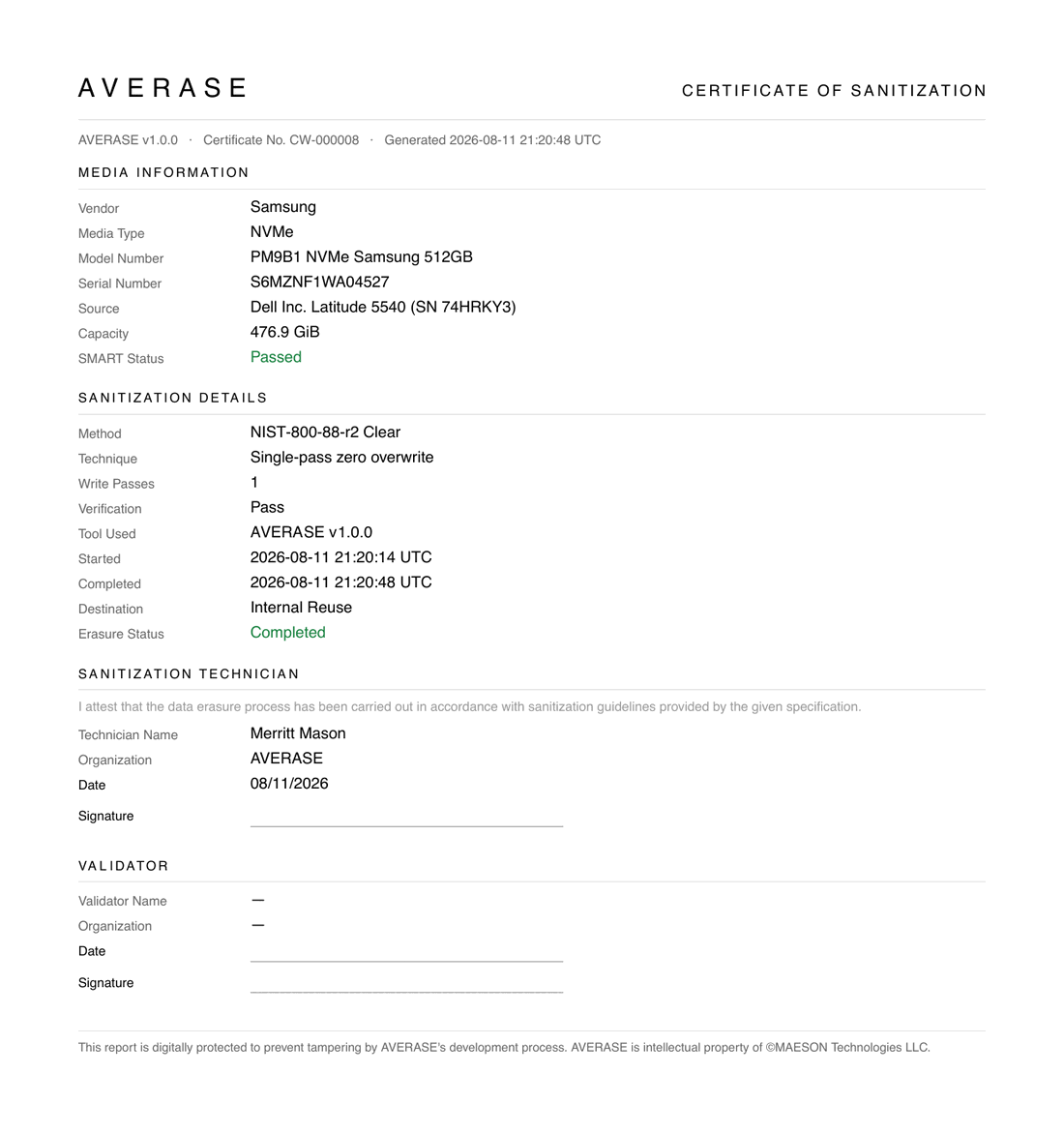
Media Information
| Field | Contents |
|---|---|
| Vendor | Drive vendor as read from the hardware — Samsung. |
| Media Type | Bus/media class — NVMe, SATA SSD, HDD. |
| Model Number | The drive's model string — PM9B1 NVMe Samsung 512GB. |
| Serial Number | The drive serial the wipe was keyed to — S6MZNF1WA04527. |
| Source | The machine the drive was recovered from, Vendor Model (SN …). Blank for hotswap-station wipes. |
| Capacity | Usable capacity in binary units — 476.9 GiB. |
| SMART Status | The drive's self-assessment at wipe time — Passed (green) / Failed (red). |
Sanitization Details
| Field | Contents |
|---|---|
| Method | The NIST method with its revision — NIST-800-88-r2 Clear or NIST-800-88-r2 Purge. |
| Technique | What actually ran — Single-pass zero overwrite, NVMe Sanitize — crypto erase, ATA Secure Erase, … |
| Write Passes | 1 for overwrite-class techniques; blank for firmware operations, where passes are not a meaningful measure. |
| Verification | Pass — no certificate is issued on anything else. |
| Tool Used | The signing engine build — AVERASE v1.0.0. |
| Started / Completed | Job start and end, UTC. |
| Destination | Where the media is headed after release — Internal Reuse. |
| Erasure Status | Completed (green). |
Sanitization Technician
The attestation statement, printed verbatim:
I attest that the data erasure process has been carried out in accordance with sanitization guidelines provided by the given specification.
Below it, Technician Name, Organization, Date (MM/DD/YYYY, filled in), and a ruled Signature line for wet ink.
Validator
Blank rows for independent quality-control sign-off, per the NIST form: Validator Name and Organization print — when no validator is recorded, with ruled lines for Date and Signature.
A footer closes the page: "This report is digitally protected to prevent tampering by AVERASE's development process. AVERASE is intellectual property of ©MAESON Technologies LLC."
The Erasure Report
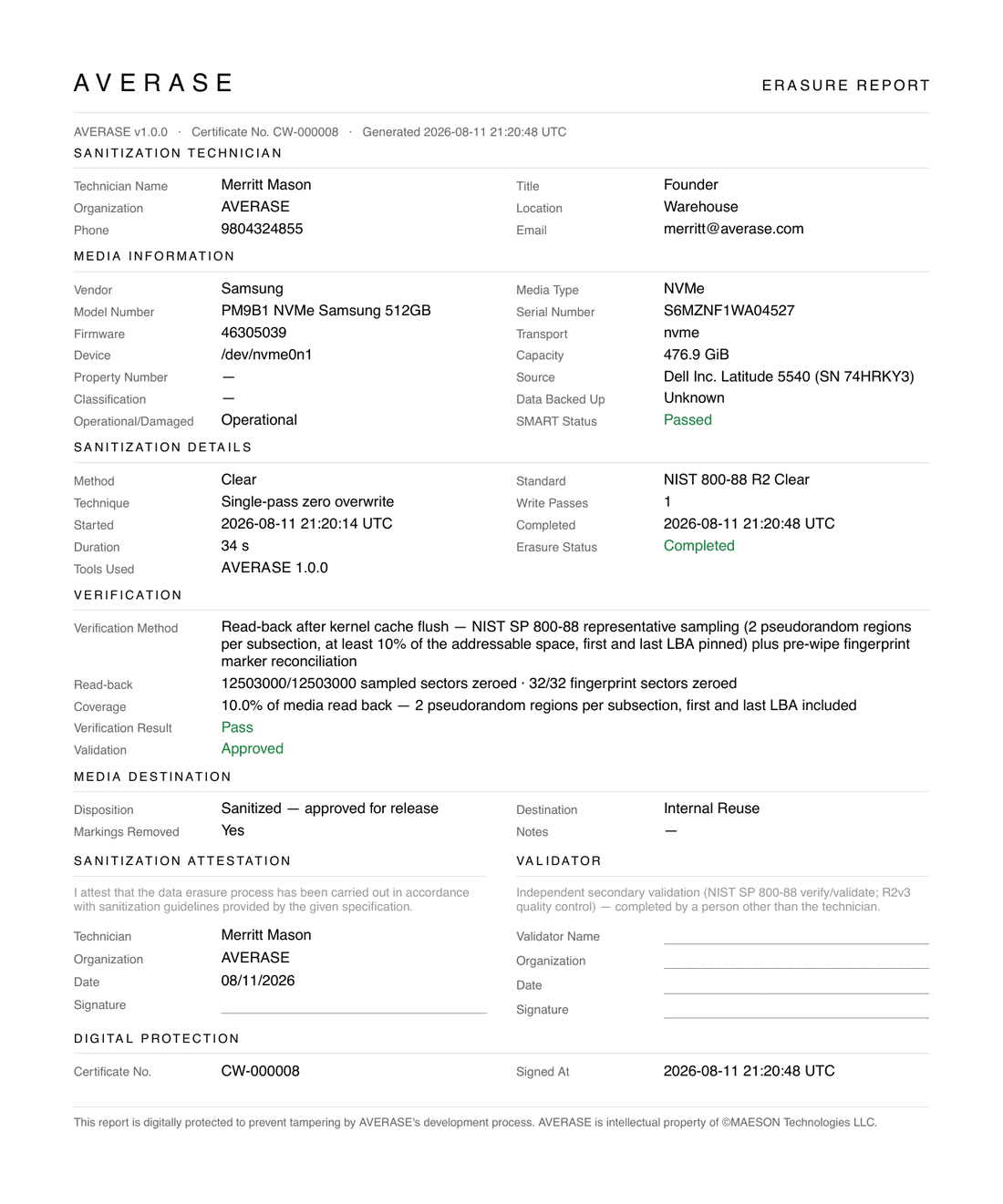
The same wipe, in full. It carries the identical header and meta line, then lays seven sections out in two columns.
Sanitization Technician
The contact block the short certificate omits — all six fields come from the account's certificate profile.
| Field | Contents |
|---|---|
| Technician Name | Merritt Mason |
| Title | The technician's role — Founder. |
| Organization | AVERASE — falls back to the account name when the profile leaves it unset. |
| Location | Where the sanitization was performed — Warehouse. |
| Phone | Contact number for follow-up on the record. |
| Contact address for follow-up on the record. |
Media Information
Everything on the certificate, plus the identifiers a technical audit asks for.
| Field | Contents |
|---|---|
| Vendor · Media Type · Model Number · Serial Number | As on the certificate. |
| Firmware | Drive firmware revision at wipe time — 46305039. |
| Transport | The bus the drive was erased over — nvme, sata, usb. |
| Device | The kernel device node the engine operated on — /dev/nvme0n1. |
| Capacity | 476.9 GiB. |
| Property Number | Your own asset/property tag for the drive; — when unset. |
| Source | The machine the drive came out of, matched from inventory. |
| Classification | Data classification of the media before erasure; — when unset. |
| Data Backed Up | Whether the data was captured before the wipe — Yes / No / Unknown (the default). |
| Operational/Damaged | Physical condition at wipe time — Operational / Damaged. |
| SMART Status | Passed (green) / Failed (red). |
Sanitization Details
| Field | Contents |
|---|---|
| Method | The bare method — Clear, Purge, or Destroy. |
| Standard | The specification it was performed against — NIST 800-88 R2 Clear. |
| Technique | Single-pass zero overwrite. |
| Write Passes | 1, or blank for firmware operations. |
| Started / Completed | UTC timestamps. |
| Duration | Elapsed wall-clock time — 34 s. |
| Erasure Status | Completed (green). |
| Tools Used | Engine and tool versions recorded at preflight — AVERASE 1.0.0. |
Verification
The section that makes the report worth keeping: not just that the wipe verified, but how much of the drive was re-read to prove it. See Verification & results for the mechanics.
| Field | Contents |
|---|---|
| Verification Method | The procedure, spelled out: "Read-back after kernel cache flush — NIST SP 800-88 representative sampling (2 pseudorandom regions per subsection, at least 10% of the addressable space, first and last LBA pinned) plus pre-wipe fingerprint marker reconciliation". |
| Read-back | The counts, verbatim from the engine — 12503000/12503000 sampled sectors zeroed · 32/32 fingerprint sectors zeroed. For crypto/block-erase techniques, where post-erase content is unpredictable, this reads as fingerprint sectors overwritten instead. |
| Coverage | How much of the medium was actually re-read — 10.0% of media read back — 2 pseudorandom regions per subsection, first and last LBA included. |
| Verification Result | Pass (green). |
| Validation | Approved (green) — the axis that gates certification at all. |
Media Destination
| Field | Contents |
|---|---|
| Disposition | The release decision in words — Sanitized — approved for release. |
| Destination | Where the media goes — Internal Reuse, Resale, Return to client, … |
| Markings Removed | Whether media markings and labels were stripped — Yes / No. |
| Notes | Free text on the record; — when empty. |
Sanitization Attestation and Validator
Side by side. The attestation repeats the certificate's statement over Technician, Organization, Date, and a signature line. The Validator column states its purpose — "Independent secondary validation (NIST SP 800-88 verify/validate; R2v3 quality control) — completed by a person other than the technician" — over ruled lines for Validator Name, Organization, Date, and Signature.
Digital Protection
The report closes by printing what the signature covers: Certificate No. and Signed At. The printed block is a pointer, not the proof — the authority is the verify endpoint.
Where the fields come from
Nothing on either document is typed in at generation time. Every value is drawn from a record that already existed when the wipe finished:
| Source | Fields it supplies |
|---|---|
The wipe result the engine posts (POST /api/wipe_result) | Method, Standard, Technique, Write Passes, Started, Completed, Duration, Erasure Status, the verification counts and coverage, Verification Result, Validation, Disposition, Markings Removed, Tools Used, Serial, Model, Capacity. |
| The once-per-boot asset report | Vendor, Media Type, Firmware, Transport, Device node, SMART Status, and — by matching the drive serial against the reporting machine — the Source line. |
| The asset record in /inventory | Property Number, Classification, Data Backed Up, Operational/Damaged, Destination, Notes. Editable in the web app; the PDFs render whatever is stored the moment they are generated. |
| The account's certificate profile | The whole technician block: Name, Title, Organization, Location, Phone, Email. Organization falls back to the account name when unset. |
| The certificate record itself | Certificate No., Generated, Signed At, and the AVERASE v<version> stamp in the meta line. |
Unset values print as — (or Unknown for Data Backed Up) rather than being omitted, so a reader can tell a blank field from a missing section. Hotswap-station wipes leave Source blank: drives pass through a chassis rather than living in one machine, so there is no source asset to match.
Units and labels differ between the PDFs and the API on purpose. The
documents print binary capacity (476.9 GiB) because that is what the
operator sees on the drive; the API's drive_capacity_gb is decimal (512).
Likewise the certificate prints one combined NIST-800-88-r2 Clear label
where the report splits it into Method (Clear) and Standard
(NIST 800-88 R2 Clear), and the API's wipe_method carries the combined
form. Same wipe, three renderings of the same fact.
Cryptography
Three mechanisms protect a certificate's integrity. All three cover the record, so they cover both documents equally.
- Ed25519 signature. The certificate's facts are serialized into a canonical payload with a fixed field order —
certificate_number,account,drive_serial,drive_model,drive_capacity_gb,wipe_method,passes_completed,started_at,completed_at,verification_hash,signed_at— and signed with a dedicated Ed25519 key (separate from the device-token key). The public key is published alongside the signature, so verification never requires trusting the PDF itself. - HMAC tamper token. An independent HMAC-SHA256 over the same canonical payload, keyed by a server-side secret. The public verify endpoint recomputes it — any altered field flips the answer to
"valid": false. - Verification hash. The payload embeds the wipe's own
verification_hash— a SHA-256 over every byte the engine re-read from the drive during post-wipe verification — chaining the certificate to the physical evidence.
Because the signature covers the record rather than the file bytes, an edited PDF does not produce a different signature — it produces a document whose printed facts no longer match the ones the verify endpoint returns. Compare the two and the edit is obvious.
Storage and download
Finished PDFs live in private object storage (R2) — objects are never publicly listable or directly addressable. Downloading one goes through the web app, signed in and scoped to your account, and each request responds with a redirect to a presigned URL valid for 5 minutes:
| Request | Returns |
|---|---|
GET /certificates/:id | The Certificate of Sanitization. |
GET /certificates/:id?document=report | The Erasure Report. |
If generation hasn't finished you're redirected back with "Certificate is still generating."
There is no certificate index page. /wipes is the certificate listing: its Certificate column links both documents for each certified wipe (opening in a new tab), shows Pending / Generating / Failed badges while in flight, and marks non-certifiable wipes "Not issued" with the tooltip "Certificates are only issued for successful, verified wipes".
A certificate_generated webhook fires when generation finishes, if you want to pull certificates into your own systems as they're issued.
Verify a certificate
The verify endpoint is public — no authentication, no account. Give the URL to a downstream buyer or auditor and they can confirm, against AVERASE's own records, that a certificate is genuine and untampered.
The endpoint recomputes the certificate's tamper token from the stored facts and returns the signed payload. It is document-agnostic: one certificate id covers both PDFs, and the facts it returns appear on each. Three outcomes:
- Valid —
200with"valid": trueand every signed fact, so the caller can compare them against the PDF in hand. - Tampered —
200with"valid": false: the certificate exists but its stored facts no longer match their tamper token. - Unknown —
404with"valid": falseand"error": "not_found": no such certificate.
Response fields (valid certificate)
- Name
valid- Type
- boolean
- Description
Whether the certificate's facts match their tamper token.
- Name
certificate_number- Type
- string
- Description
The printed reference, e.g.
CW-000241.
- Name
account- Type
- string
- Description
Name of the account the certificate was issued to.
- Name
drive_serial- Type
- string
- Description
Serial number of the sanitized drive.
- Name
drive_model- Type
- string
- Description
Model string of the sanitized drive.
- Name
drive_capacity_gb- Type
- integer
- Description
Drive capacity in decimal gigabytes.
- Name
wipe_method- Type
- string
- Description
The method used, e.g.
NIST 800-88 R2 Purge.
- Name
passes_completed- Type
- integer
- Description
Write passes for overwrite-class techniques;
nullfor crypto/block-erase techniques.
- Name
completed_at- Type
- timestamp
- Description
When the wipe finished (ISO-8601, UTC).
- Name
signed_at- Type
- timestamp
- Description
When the certificate was signed.
Request
curl https://averase.com/certificates/cert_abc123/verify
Response — valid
{
  "valid": true,
  "certificate_number": "CW-000241",
  "account": "MAESON Technologies LLC",
  "drive_serial": "S6MZNF1WA04527",
  "drive_model": "SAMSUNG MZVL2512HCJQ",
  "drive_capacity_gb": 512,
  "wipe_method": "NIST 800-88 R2 Purge",
  "passes_completed": 1,
  "completed_at": "2026-08-01T14:22:07Z",
  "signed_at": "2026-08-01T14:22:09Z"
}
Response — tampered
{
  "valid": false,
  "certificate_number": "CW-000241",
  "account": "MAESON Technologies LLC",
  "drive_serial": "S6MZNF1WA04527",
  "drive_model": "SAMSUNG MZVL2512HCJQ",
  "drive_capacity_gb": 512,
  "wipe_method": "NIST 800-88 R2 Purge",
  "passes_completed": 1,
  "completed_at": "2026-08-01T14:22:07Z",
  "signed_at": "2026-08-01T14:22:09Z"
}
Response — not found (404)
{
  "valid": false,
  "error": "not_found"
}
What's next?
- Wipes — the grid where certificates surface
- Certificate verification API — the endpoint in the API reference
- The wiping process — methods, techniques, and the verification that feeds the certificate
- Inventory — where Property Number, Classification, and Destination are edited
- Webhooks — get notified the moment a certificate is generated